


In this Article, step-by-step guide to every important SEO action you need to take for 10x Your Traffic from Google.
Introduction
Do you know WordPress powers nearly one-third of the world’s websites? As a site builder and a content management system, the wide coverage is not only because WordPress is free for downloading and installing, but it has unique features and open source. There are 8 reasons that make WordPress one of the most popular content management systems in the world.
1. Flexible and adaptable for changing needs
2. User-friendly
3. Multiple popular themes
4. Multiple plugins extend the functionalities of websites
5. SEO (search engine optimization) friendly
6. Mobile responsive
7. Add build-in Blogs
8. Offer professional support

Bing Webmaster Tools is the similar free tool, just providing data and insights for their search engine.
Check Search Console for Manual Actions includes things like user-generated spam, structured data issues, unnatural links (both to and from your site), thin content, hidden text and even what is referred to as pure spam.

Why use WordPress for our E-commerce website development
Open-source
Because WordPress has an open source for developers to use and the wide range of developers develop multiple plugins and themes, WordPress can always fulfil the needs of market and users. Besides, many of the plugins are free to be used, which adds even more competitiveness to WordPress. If you use WordPress for your E-commerce website development, you can save not only money but also time for the whole project. In the long run, the open-source can support the maintenance of your website, which is a great benefit you can obtain.
Powerful plugins and extensions
WordPress has many powerful e-commerce plugins. These powerful plugins can fulfil almost all the features you need. Whether you are selling physical products or digital products, you can post products, manage your inventories, and collect your income on your website via the support of the plugins. WooCommerce is the most popular WordPress e-commerce plugin. It has great extensions to support your marketing promotion, loyalty programs, product customization, and so on. WP eCommerce offers all basic e-commerce website functions, such as shipping, membership and payment functions.
SEO friendly
You may hard the WordPress is SEO-friendly, but do you know why is that? Here are the reasons.
Proper HTML Markup
WordPress creates HTML pages that can be easily understood by search engines. Search engines use their crawlers to find the most relevant result for users after users putting the keywords into the search bar. Proper HTML page markup and structures can help crawlers get the full information of the websites and rank it better.
SEO-friendly permalinks
WordPress can use “beautiful permanent links”. This means the links to posts, articles, and pages can contain keywords so that search engines and visitors know what they are about. Of course, you can control the content of the links.
Title tag and headings
The title of the page (usually wrapped in an H1 tag) is one of the most important parts of page SEO. All the tags and headings provide structure to the information in the content to Google while mixing up the H1 tags with other title tags will hurt SEO rankings. WordPress allows you to set all of these tags and headings without having to manually write the necessary HTML tags, which means you can easily manage the structure of your content.
Images optimization
An E-commerce website has plenty of product images, which makes image optimization an essential work for website SEO ranking. WordPress editor allows users to optimize ALT tags, image descriptions, and so on.
Quick-Loading Site
If you pick a high-quality theme, use a good server and optimize the pictures on your website, you will find WordPress is a great CMS for you to rank better. Do not forget to keep your core technology up to date and have regular database maintenance, a website can not perform perfectly without regular monitoring.
Mobile friendly
WordPress is a mobile-friendly platform. Considering more than 50%of online shopping is typically done via smartphones, a mobile-friendly feature is vital to your business.
Multiple payment options
It is obvious that payment option plays a significant role in online shopping. WordPress supports many different payment gateways, such as PayPal, Stripe, and so on. With so many trusted e-commerce payment gateways, you are sure to find one that you would like to use and trust in your own business, as well as one that customers will be able to access easily. If you have more questions about building an E-commerce website by using WordPress, contact Aussiedigital today!
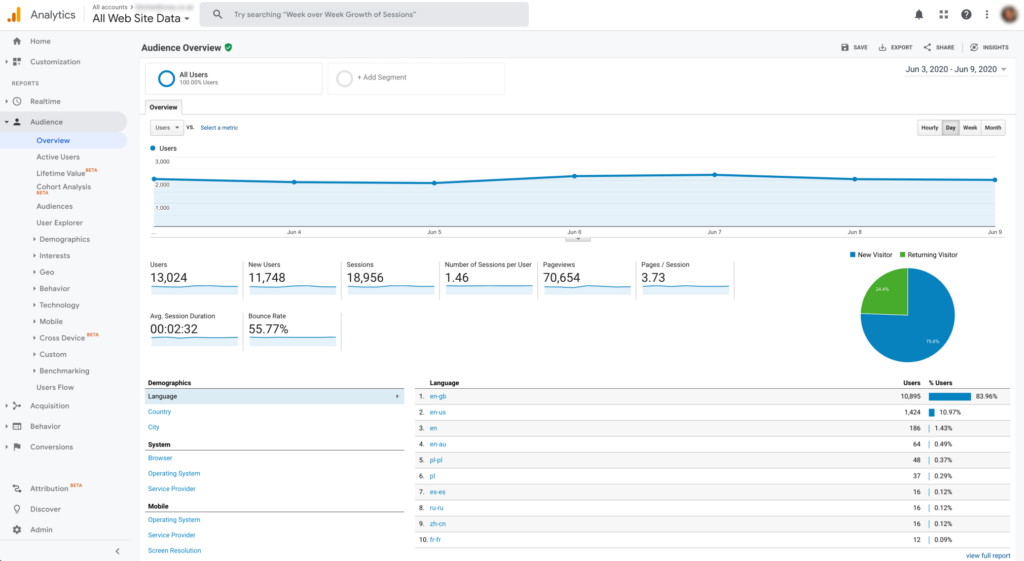
3. Install and Configure An SEO Plugin (If You Are Using WordPress)
If you are using WordPress you should install and configure an SEO plugin to provide the functionality and features that you need to properly optimize your site.
Our recommendation: Rank math
4. Generate and Submit a Sitemap
In Google’s own words:
A sitemap tells the crawler which files you think are important in your site, and also provides valuable information about these files: for example, for pages, when the page was last updated, how often the page is changed, and any alternate language versions of a page.
Google supports a number of different sitemap formats, but XML is the most commonly used. You will usually find your site’s sitemap at https://www.domain.com/sitemap.xml.
Once you have generated your sitemap from https://www.xml-sitemaps.com/, ensure that this is submitted to Google Search Console and Bing Webmaster Tools.
What Submit Sitemap looks like

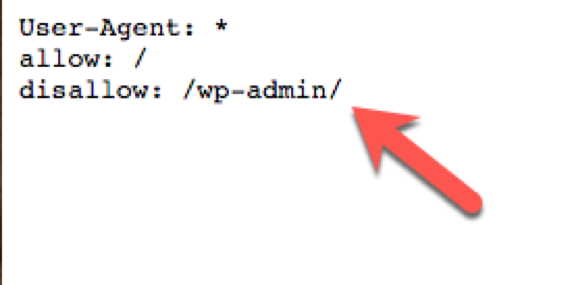
5. Create a Robots.txt File
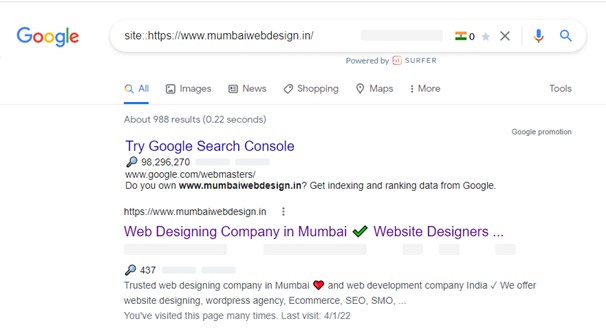
6. Ensure That Google Index Your Website pages
To check Just Type Site::https://www.domain.com/page_url
A Keyword Research Checklist
Without a strong keyword research process, you won’t rank for the right terms, and if you are not positioning for the right terms, your traffic isn’t going to convert.
Here is a keyword research checklist as below:
6. Identify Your Competitors
Before keyword research you know where your competitors stand out, find the terms that are working for your competitors so it’s easy and quick for you do keyword research.
There are many tools available but i recommend traditional free google keyword planner and Find Your Main ‘Money’ Keywords
Find Long-Tail Keyword Variations because lower volume but deliver a higher conversion rate.
Technical SEO Checklist
Technical SEO helps you to create strong foundations and implementation. Here are the most widely recognized areas of best-practice that you want to focus on.
7. Make Sure You Are Using HTTPS
It is 2022, and HTTPS has been known as a ranking factor since 2014.
There is no excuse for not using HTTPS encryption on your site, and if you are still running on HTTP, it is time to migrate.
8. Check for Duplicate Versions of Your Site In Google’s Index
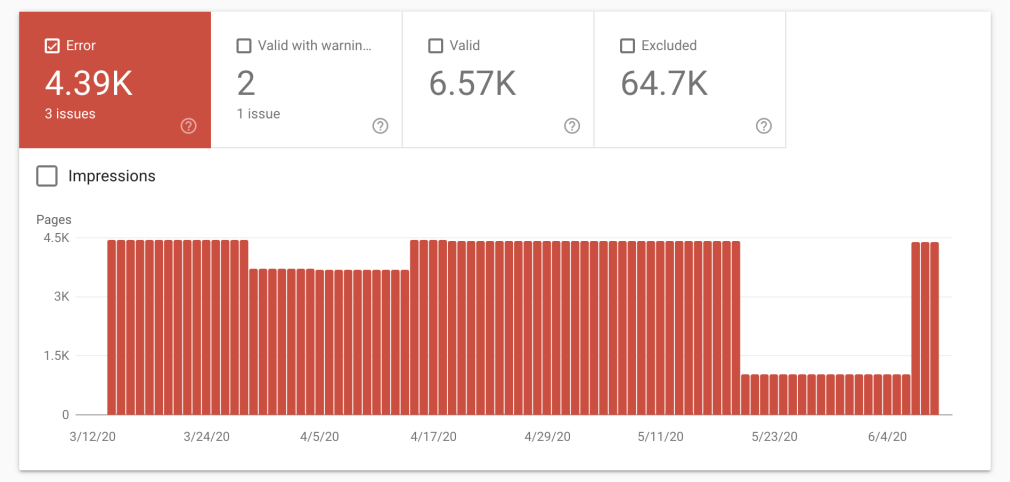
9. Find and Fix Crawl Errors
You can identify if there any crawl errors that exist through Google Search Console.
Head to the below screenshot, and you will see both errors and excluded pages, as well as those with warnings and those which are valid.
10. Improve Your Site page Speed
Slow Loading sites impact on ranking factor, Google has recently confirmed an upcoming page experience update for 2021.
There are many powerful platforms available to check some of them as GTMetrix Speed Test, Pingdom, PageSpeed Insights Test (Mobile-only), Byte Check TTFB Test, etc
11. Add Structured Data Markup
Structured data helps your organic posting stand out on the Search Engine Results Pages. There are many structuring data options avialable like faq, people, places, organizations, local businesses, reviews, and so much more.
If you are not previously using structured data, you should be.
Head to the below screenshot, you will see both the review stars and the price that enhances the result.

On-Page SEO and Content Checklist
Without SEO oriented content and a great on-page experience, you will battle to rank your site and increase your organic traffic. On-Page SEO and Content both are very essential for ranking.
So, Lets proceed.
12. Find and Fix Duplicate, Missing Meta Title
On-Page SEO First significant step is add proper Meta title because it informs search engines what a page is about and should not be duplicate. You also need to make sure that title tags aren’t missing OR blank.
13. Find and Fix Duplicate, Missing Meta Description
Quite simply, it is your Meta description that encourages a user to click on your listing over someone else’s and can either positively or negatively affect your organic CTR.
14. Find and Fix Heading Tags
We need to follow google guidelines about heading tags counting limit for each page.
H1 tag should be add on content’s main heading or page’s main target keyword, and there should only be one in place per page.
H2 tag we can use upto 10 for each page
h3 – h6 tag we can use upto 10 for each page
15. Ensure Images Use ALT Tags
You should focus on image optimization. Ensure that the images on each page of your website use ALT tags to properly describe the content of it.
17. Analyze Your Competitor’s Link Profile
To outrank our competitor’s on SERP’s you much know insight about competitor’s link profile. There many backlink analytics tool available to analyze your competitor’s link profile and start to know the overall quality and authority of the links that point to their site.
18. Set Up and Optimize Google My Business
Off-page factors go way beyond just links, regardless of these being a key ranking factor.
If you are running a local business, make sure that you are listed (and ranking) on Google My Business; otherwise, you will literally be giving visits to a competitor.
There you go, a 19 steps SEO checklist that both beginners and more advanced SEOs can follow and hopefully find at least a few ways to improve their site’s optimization.
Improve Your SEO Presence Today 🙂